A rowing machine screen that isn’t working typically indicates issues with its power supply, cable connections, or internal sensors. Approximately 60% of display failures are due to battery corrosion from sweat. Many common problems, such as dead batteries or loose wires, can be resolved with simple troubleshooting steps at home, ensuring you can track crucial metrics like strokes, distance, and calories during your workouts.
Common Causes of a Non-Functional Rowing Machine Screen
Understanding why your rowing machine screen isn’t working is the first step toward a solution. Often, the issue stems from a handful of common culprits, ranging from simple power problems to more intricate connection or sensor malfunctions. Recognizing these typical causes can help you diagnose the problem efficiently.
Power Supply Issues
The most frequent reason for a dead or erratic display is directly related to its power source. Many rowing machines use batteries, while others rely on an AC adapter.
- Dead or Low Batteries: Over time, batteries lose their charge. If your monitor uses AA or CR2032 batteries, they may simply be depleted and require replacement.
- Incorrect Battery Alignment: Even new batteries won’t work if they’re inserted incorrectly, with the positive (+) and negative (-) poles misaligned.
- Corroded Battery Contacts: Sweat, humidity, or prolonged disuse can lead to corrosion on battery terminals, preventing proper electrical contact. Research indicates that corrosion from sweat is responsible for approximately 60% of display failures.
- Damaged AC Adapter or Loose Connection: For machines powered by an AC adapter, a damaged cord, a loose plug at either the machine or the wall outlet, or a faulty wall outlet itself can cut off power to the screen.
Connection Problems
The display relies on various cables and wires to receive power and data from the machine’s internal components.
- Loose or Damaged Wires: Over time, especially with regular use and vibration, the monitor cable connecting the display to the flywheel housing or sensor can become loose. Cables might also get pinched, frayed, or broken, disrupting the signal.
- Sweat and Dust Residue: Accumulation of sweat, dust, and debris in the connectors can degrade signal transmission, causing the screen to flicker or go blank.
Sensor Malfunctions
For your screen to display workout data, it needs to receive information from internal sensors that track your strokes and resistance.
- Misaligned or Obstructed Sensor: The sensor (often near the flywheel or resistance mechanism) might be misaligned or blocked by debris, preventing it from accurately reading data.
- Damaged Sensor: While less common, the sensor itself could be faulty, leading to a “monitor powered on but no data” scenario.
Internal Component Failure
|
Our Picks for the Best Rowing Machine in 2026
As an Amazon Associate I earn from qualifying purchases.
|
||
| Num | Product | Action |
|---|---|---|
| 1 | Foldable Rowing Machines for Home with Adjustable Large Water Tank & Comfortable Seat for Real Experience Immersive Water Rower, APP Link,Joint 0 Impact 330LBS Weight Capacity; |

|
| 2 | Rowing Machines for Home,Water Rowing Machine with Foldable Design,400LBS Capacity,LCD Monitor,Smooth Glide Rails,Comfortable Seat,Free App(Bluetooth) Supported for Immersive Water Rower&Home Gym |
|
| 3 | Rowing Machine,Wenoker Magnetic Rower Machine for Home,App Supported 350 LB Weight Capacity, Smooth Whisper Quiet with LCD Monitor Tablet Holder & Comfortable Seat Cushion, Compact and Saves Space |
|
| 4 | Rowing Machine for Home, Magnetic Rower Machine, 350 LB Weight Capacity, 16-Level Silent Resistance Row Machine for Gym Exercise Full-Body Workout Compact Rower with LCD Monitor Tablet Holder |
|
| 5 | MERACH Rowing Machines for Home, Magnetic Rowing Machine with 16 Levels, Rower Machine of Quiet Resistance, Dual Slide Rail with Max 350lbs Weight Capacity, App Compatible |
|
| 6 | Rowing Machine for Home, 16 Resistance Levels, Quiet Magnetic Rower with APP, 350 LB Weight Capacity, Easy Assembly, Compact and Saves Space |
|
| 7 | Rowing Machine Magnetic Rower with 16 Resistance Levels, Quiet Home Rowing Machine for Cardio Training, APP Connection, 160 kg Load Capacity, Vertical Storage |
|
| 8 | Rowing Machine,Wenoker Magnetic Rower Machine for Home,App Supported 350 LB Weight Capacity, Smooth Whisper Quiet with LCD Monitor Tablet Holder & Comfortable Seat Cushion, Compact and Saves Space |
|
| 9 | Rowing Machines for Home, 16 Level Adjustable Resistance, Magnetic Rowing Machine with App Supported, 350 LB Weight Capacity, Upgraded Dual Slide Rails with LCD Data Display Screen |
|
| 10 | Rowing Machine for Home, 350 LB Capacity, 16-Level Silent Resistance, Magnetic Rowing Machines for Home Foldable, Full-Body Workout Compact Rowing Machine for Cardio & Strength with APP Support |
|
Sometimes, the problem lies deeper within the machine’s electronics.
- PCB (Printed Circuit Board) Issues: The internal circuit board controlling the display and other functions can fail due to age, stress, or manufacturing defects.
- Firmware Glitches: For smart rowing machines with advanced consoles, outdated or corrupted firmware can cause erratic behavior, incorrect readings, or a completely unresponsive screen.
- Internal Electrical Faults: Deeper electrical problems within the machine could prevent the display from receiving necessary power or data.
Environmental Factors and Wear
External factors and general wear can also contribute to screen issues.
- Physical Damage: If the machine has been moved or jostled, connections can become loose, or the screen itself might suffer damage.
- Age and Wear: Like any electronic device, components can degrade over time, leading to eventual failure.
Step-by-Step Troubleshooting for Your Rowing Machine Screen
When your rowing machine screen goes dark or starts acting erratically, a systematic approach to troubleshooting can often pinpoint and resolve the problem. Start with the simplest checks before moving on to more complex diagnostics.
Initial Checks (Easy Wins)
These steps are quick, require minimal tools, and often solve the most common display issues.
1. Verify Power Source
- For Battery-Powered Monitors:
- Replace Batteries: The first and most crucial step is to replace all batteries with fresh ones. Even if you think they have charge, low batteries can cause flickering or a blank screen. Many monitors use AA or CR2032 batteries.
- Check Alignment: Ensure the new batteries are inserted correctly, observing the positive (+) and negative (-) indicators.
- Clean Contacts: Remove the batteries and inspect the metal contacts in the battery compartment. If you see any green or white residue (corrosion), gently clean it off with a cotton swab dipped in vinegar or rubbing alcohol. Allow to dry completely before reinserting batteries.
- For AC Adapter-Powered Monitors:
- Inspect Adapter and Cable: Examine the entire power cord and AC adapter for any visible damage, such as fraying, cuts, or exposed wires. If damaged, a replacement adapter is likely needed.
- Secure Connection: Ensure the AC adapter is securely plugged into both the rowing machine console and a functioning wall outlet. Wiggle the connection points gently to see if the screen flickers.
- Test Outlet: Plug another small appliance into the wall outlet to confirm it’s providing power. If not, try a different outlet.
2. Inspect All Connections
- Trace Monitor Cable: Locate the cable that runs from the display monitor down into the main body of the rowing machine, often near the flywheel housing or front support.
- Wiggle and Reseat: Gently wiggle the connections at both ends of the cable. If the display flickers or comes on, the connection is loose. Disconnect the plug, inspect the pins for any bends or damage, and then firmly reseat it until you hear a click or feel it lock into place.
- Check for Pinches: Trace the entire length of the cable to ensure it isn’t pinched under the rail, trapped by moving parts, or otherwise damaged. Secure loose cables with zip ties if necessary to prevent future disconnections due to vibration.
3. Perform a Reset
- Power Cycle: Sometimes, a simple power cycle can resolve minor software glitches. If your machine has a power button, turn it off, wait 30 seconds, and turn it back on.
- Hard Reset: For battery-powered units, removing the batteries and leaving them out overnight can perform a deeper reset. For some models, holding down specific buttons (e.g., “Menu” and “Reset” or “OK” and “Reset”) for 10-15 seconds can reset the monitor. Refer to your rowing machine’s manual for specific reset procedures.
- NordicTrack Specific Reset: For NordicTrack RW 900, if the monitor is frozen, unplug the power adapter, locate a small reset opening on top of the console. Use a bent paperclip to press and hold the reset button inside the opening while someone else plugs in the power adapter. Continue holding until the console turns on.
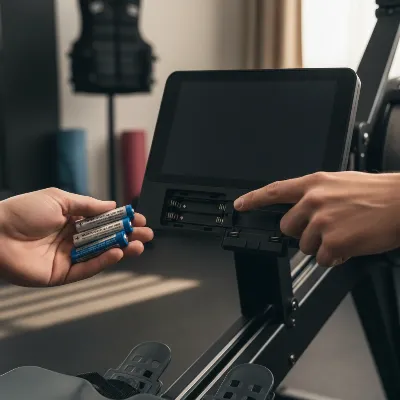 Person inspecting a rowing machine screen for power and connection issues
Intermediate Diagnostics
If the initial checks don’t resolve the issue, you might need to delve a bit deeper.
1. Check Sensor Functionality
- Visual Inspection: Locate the sensor, typically near the flywheel or resistance mechanism. Ensure it’s properly positioned and there’s no debris or obstruction between the sensor and its corresponding magnet (if applicable).
- Magnet Test (for magnetic resistance rowers): For some models, you can test the sensor by removing the covers and manually passing a refrigerator magnet in front of the sensor. If the monitor (which should now be powered on) still doesn’t track data, the sensor might be damaged and require replacement.
2. Examine for Wire Damage
- Internal Wiring: If comfortable, you might need to open parts of the machine (following manufacturer guidelines) to inspect internal wiring, especially the “pickup wire” that leads from the monitor to the flywheel. Look for frays, breaks, or loose connections. If such damage is found, the wire typically needs replacement.
- Port Inspection: Inspect the monitor pickup wire port on the bottom of the monitor. A crack in the port could necessitate monitor replacement.
3. Look for Environmental Residue
- Clean Ports and Connectors: Over time, sweat and dust can build up in any exposed port or connector, degrading signal quality. Use compressed air or a dry cotton swab to gently clean these areas.
Advanced Considerations (When to Call a Pro)
Some issues are beyond basic DIY repair and warrant professional attention.
1. Firmware Updates
- For smart rowing machines (e.g., WaterRower Series 4, NordicTrack), outdated firmware can cause performance monitor glitches, erratic stroke counts, or resistance errors. Check if your machine has an accompanying app (like WATERROWER Connect) that can auto-check for and install updates. Always ensure your firmware is current.
2. Internal Component Issues
- PCB Board Failure: If the display remains blank despite fresh batteries and secure cables, an internal PCB board failure is likely. This is a complex repair that should not be attempted by untrained individuals, as static discharge can damage components.
- Motor Wires (for automatic resistance machines): If an automatic resistance machine’s monitor displays “no data” or an “E01 error,” and resistance seems off, check if motor wires have come loose inside the baffle. This might require disassembling parts of the machine.
- Manufacturer Support: For issues like PCB failure or persistent problems after trying all troubleshooting steps, especially with brands like Concept2 or WaterRower Series 4, contact the manufacturer’s support. For some brands like NordicTrack and ProForm, monitor issues might even require full unit replacement.
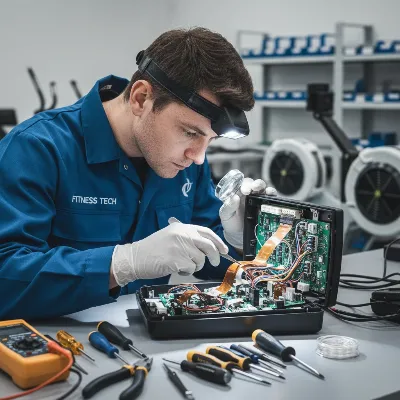 Professional examining rowing machine internals for wiring issues
> “While many display issues are simple fixes, don’t hesitate to seek professional help if you suspect an internal electrical fault or PCB damage. Attempting complex repairs without expertise can lead to further damage or even void your warranty.” – Dr. Alex Chen, Fitness Equipment Repair Specialist
Preventing Rowing Machine Screen Issues
Proactive maintenance can significantly extend the life of your rowing machine’s display and prevent many common problems from occurring.
- Regular Cleaning: Regularly wipe down your rowing machine, especially around the monitor and cable connections, to remove sweat, dust, and debris. Use a soft, dry cloth; avoid harsh chemicals that could damage the screen or electronics.
- Check Connections Periodically: Every few weeks, quickly check all power cords and data cables to ensure they are tight, secure, and free from kinks or pinches.
- Timely Battery Replacement: If your monitor uses batteries, replace them annually or whenever you notice the display dimming or acting sluggish, even if it’s not completely dead. This prevents battery corrosion.
- Proper Storage: Store your rowing machine in a dry, temperate environment, away from direct sunlight, extreme heat, or excessive humidity, which can degrade electronics over time.
- Careful Handling: When moving your rowing machine, do so carefully to avoid jarring the console or pulling on cables that could lead to loose connections or internal damage.
Buying Guide (Rowing Machine Monitor Troubleshooting)
When your rowing machine screen malfunctions, knowing how to approach the situation is key to a swift resolution. This buying guide helps you navigate the diagnostic process effectively.
- Prioritize Simple Checks: Always start with the easiest fixes: checking batteries/power, and inspecting external connections. These resolve the majority of display problems.
- Consult Your Manual: Your rowing machine’s user manual is an invaluable resource. It often contains specific troubleshooting steps, error code explanations, and contact information for customer support.
- Identify Your Rower Type: The troubleshooting steps can vary slightly depending on whether you have a magnetic, air, water, or hydraulic rower, and whether its monitor is battery-powered or AC-powered.
- When to Consider Replacement: If you’ve exhausted all basic and intermediate troubleshooting steps, and your monitor still doesn’t work, it might be time to contact the manufacturer for a replacement part or professional repair. For some budget models, replacing the entire machine might be more cost-effective than repairing a complex monitor issue.
- Avoiding Common Mistakes: Do not force connections, use incompatible power adapters, or attempt to disassemble complex electronic components unless you are experienced and follow a service manual. This can lead to further damage or void your warranty.
Conclusion
A non-functional rowing machine screen can be a significant roadblock to your fitness routine, but with a systematic approach, many common issues can be quickly identified and resolved. From simple battery replacements and checking loose connections to understanding sensor malfunctions and internal component failures, most problems have straightforward solutions. By consistently performing routine maintenance and knowing when to seek professional help, you can keep your rowing machine’s display accurately tracking your progress for years to come. What’s one unexpected fix you’ve discovered for a piece of fitness equipment?
Frequently Asked Questions
How often should I change the batteries in my rowing machine monitor?
For optimal performance and to prevent corrosion, it's generally recommended to change the batteries in your rowing machine monitor annually. You should also replace them sooner if you notice the display dimming or becoming inconsistent, as low batteries can cause erratic behavior.
Can sweat really damage my rowing machine's electronics?
Yes, sweat is a common culprit in damaging electronics. Its corrosive properties can lead to oxidation on battery terminals and internal circuit board components, causing electrical shorts or connection failures. Regularly wiping down your machine after use helps mitigate this risk.
What does an E01 error code mean on a rowing machine?
An E01 error code typically indicates a communication error between the monitor and other components, often related to the speed sensor or resistance mechanism. It usually suggests the monitor isn't receiving data. Try powering off/on, checking sensor connections, or consulting your manual for model-specific details.
Is it safe to open up my rowing machine to check the wiring?
Opening your rowing machine to check internal wiring should only be done if you are comfortable with basic electronics, have the correct tools, and ideally, a service manual for your specific model. Always unplug the machine (or remove batteries) first. If you're unsure, it's safer to consult a professional.
My screen flickers intermittently; what could be the cause?
Intermittent flickering often points to an unstable power supply or a loose connection. Check for low batteries, a loose AC adapter, or a partially disconnected data cable. Corrosion on battery contacts or dust in connectors can also cause a flickering display.
How do I know if it's a sensor problem or a screen problem?
If your screen powers on and shows some information (like time or settings), but no workout data changes when you row, it's likely a sensor problem. If the screen is completely blank, dim, or unresponsive from the start, it's more indicative of a power or screen hardware issue.
Troubleshoot a Non-Functional Rowing Machine Screen
Follow these steps to diagnose and fix common issues with your rowing machine's display screen, from power problems to connection faults.
Replace all batteries with fresh ones, ensuring correct alignment. For AC adapter-powered monitors, inspect the cord for damage, secure connections, and test the wall outlet. Low or absent power is the most frequent cause of screen issues.
Locate the monitor cable and gently wiggle its connections at both ends. If the display flickers, disconnect and firmly reseat the plug. Trace the cable's entire length to check for pinches or damage, securing loose cables with zip ties.
Power cycle your machine by turning it off for 30 seconds and then back on. For battery-powered units, remove batteries overnight for a deeper reset. Consult your manual for model-specific hard reset procedures, which often involve holding down certain buttons.
Visually inspect the sensor near the flywheel for proper positioning and obstructions. For magnetic resistance rowers, you can test the sensor by passing a refrigerator magnet in front of it while the monitor is on. If no data tracks, the sensor may be damaged.
If comfortable, open parts of the machine to inspect internal wiring for frays or breaks. Clean any exposed ports and connectors with compressed air or a dry cotton swab to remove sweat and dust residue, which can degrade signal quality.
Equipment that holds up past 60 sessions
Free PDF — 60-session wear log template + 5 treadmills compared.

My Concept2 screen went totally blank last week and I was so frustrated. I was about to call for service, but then I remembered reading about checking the battery compartment. Sure enough, there was some minor corrosion from sweat. A quick clean and new batteries, and it’s working perfectly again! So glad I didn’t have to pay for a technician.
I had no idea that battery corrosion from sweat was such a common problem for rowing machine screens. My WaterRower screen was acting up, and after reading this, I checked the batteries. Replaced them and cleaned the contacts, and it’s back to normal. It’s great to have those crucial metrics visible again during my morning rows.
This was super helpful when my Sunny Health & Fitness rower display stopped tracking my strokes. I thought it was a major internal sensor issue, but it turned out to be just a loose wire near the console. It saved me a lot of headache and probably some money too. Now I can see my distance and calories again, which is essential for my workouts.
I tried all the tips for my Stamina rower’s screen, especially checking the cable connections. The main cable was a little loose, and tightening it helped for a bit, but it still flickers sometimes. It’s better than nothing, but I was hoping for a more permanent fix. Still, it’s good to know what to look for.